Saturday, 11 September 2021

How To Unblock The Blocked Website On Google Chrome — MarketGit


It is very common when you search some website on chrome and it shows the message “The site cannot be reached” or something like that. Well, Google Chrome is the most popular browser that millions of people use daily but it restricts various websites in different geographical areas. Google Chrome denies the websites for many reasons like dangerous websites, suspicious links, and some technical reasons — Unblock The Blocked Website On Google Chrome.

So, Google Chrome will not allow you to access the sites having these issues. But don’t worry, I am going to show you the solutions to unblock websites on chrome by simple and easy methods.

4 tricks to unblock the blocked websites on google chrome:

Trick 1: Unblock the site from the restricted sites list


Initially, check your proxy settings to confirm that is the website on the restricted sites list or not. Sometimes the sites would be added to the restricted sites list. When you find the website in this list then simply remove a website from the restriction sites list. Probably that will fix the issue to unblock the site on chrome. Just follow the steps mentioned below.

Step 1: Open your Chrome browser and click on the top-right corner as shown in the image and click the “settings” after that.

Step 2: Click on “Advanced” at the bottom-left of the screen. Now scroll to the bottom and click “Open your computer’s proxy settings”.

Step 3: Select the “Security” tab of internet properties, click on “Restricted sites” and then “Sites”.

Step 4: After clicking the “Sites”, you will see the sites in that box. Just select the site and press “Remove” button and click “OK”.

After finishing all the above steps, close Chrome and reopen it. Hope your issue will be solved. If you still face the same issue, then follow method 2 that is below to unblock the site by chrome.

Trick 2: Unblock the site by resetting the Hosts file


If the above method does not work, then it is perhaps the site has been added to the hosts file as the file contains the IP addresses. Open the hosts file and see if there is the numeric value of the website that you want to access. If yes, you cannot access the site. Just select the URL, delete it and save the file. Close the Chrome and open it again. Hope you will get the answer that how to unblock the blocked sites. You can find this hosts file by this address:

C:\Windows\System32\drivers\etc

Trick 3: Use a VPN to unblock the blocked websites


Sometimes Google blocks some websites in some geographical areas as internet restrictions vary from country to country. Google blocks the sites as per government policies and authorities so you cannot access these sites. So using VPN allows you to access any website that is blocked by Google.

The VPN diverts your location to a specific region so you can easily access the site. Just download the best VPN, open it and select a specific country and start accessing the restricted websites. This will pretend your location to that particular country.

You may be interested in how to uninstall a program using cmd.

Trick 4: Use Google Chrome Extensions to unblock the websites


Google allows users to install the extensions to Chrome. Just like the above method, add the VPN to the extension and it will work as same as other VPNs do. But you can add specific VPNs from the Chrome Web Store.

Step 1: Open Chrome and explore the list by clicking three dots on the top-right corner and then “More tools > Extensions”.

Step 2: Now click on “chrome web store”, search for “Zenmate” and press “Add to Chrome” to add ZenMate chrome extension. So create a free account and run that extension.

Finally, Zenmate VPN is recommended by me. You can use as you like best. There are plenty of VPNs that can be added to chrome like TouchVPN, Safer VPN Proxy, DotVPN, and many more.


Originally published at https://marketgit.com on September 11, 2021.

Friday, 10 September 2021

How To Uninstall a Program Using CMD — MarketGit


In Windows 10, this is very simple to uninstall the unwanted applications and software that you do not want to use anymore. Sometimes you uninstall the program but when you open your C drive, you see that program’s file ther. If you are using Windows 10 then follow the steps to uninstall programs using the command prompt.

How to uninstall programs using CMD on Windows 10:

1. First, type the “cmd” in the search bar near the Windows Start icon. Then click on “Run as Administrator”.

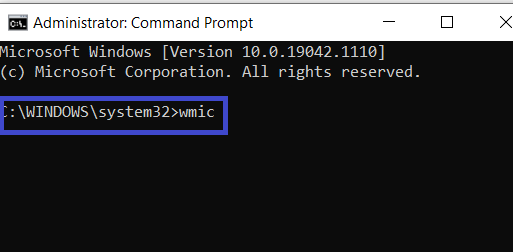
2. Command prompt screen will appear. Now write “wmic” and press the “enter” key from the keyboard.

C:\WINDOWS\system32>wmic

3. Windows Management Instrumentation Console (WMIC) is now ready to operate.

wmic:root\cli>

Now simply type the “ product get name” and press “enter” to fetch the list of programs that you want to uninstall.

4. Just paste the command below in front of wmic:root\cli> (at the end of the console):

product where name= “product name” call uninstall

And replace the “product name” with the program that you want to be uninstalled and press “enter”.

5. When you press enter, a message will appear really want to execute this command (Y/N), then you press “Y” in case of uninstalling the program or press “N” to cancel the process.

After pressing “Y”, the message will be appeared “Method execution successful”, and your application will be uninstalled from your system.

That was quite easy, right? So please tell me in the comment box if you feel any difficulty regarding these steps.


Originally published at https://marketgit.com on September 10, 2021.

Tuesday, 7 September 2021

How To Recover WhatsApp Chat History and Media Files — MarketGit


WhatsApp is the best way of fast communication in today’s world. Daily, we communicate with friends, family, partners, and work colleagues, through the exchange of messages, photos, videos, and audio, but also through real phone calls and video calls. In short, it is an apparently simple app which, however, contains a conspicuous and important part of our life. What would happen if we accidentally delete it? What would have happened with your photos, multimedia, and chats? If you have ever deleted your WhatsApp accidentally then don’t worry, not all of your data would b lost — Recover WhatsApp Chat History

In this article, I am going to explore that how to recover WhatsApp messages deleted by mistake, but also photos, videos, and audio shared in chats.

What happen

It is very common to delete an application by mistake. It could be the case when you see similar icons and you delete them in the hustle. Facebook, Instagram, TikTok, and Telegram are very similar to WhatsApp but, unlike it works on the server-side in encrypted mode.

With WhatsApp, however, things start to get more complicated. When you delete your WhatsApp account, your data does not go anywhere. It means that your data remains safe and even people can send you the text and multimedia to. But you can only receive these messages to read if you again reinstall WhatsApp to your phone. This is certainly a positive aspect, but unfortunately the only one: everything else is eliminated and the risk is that of not being able to recover this data.

Let’s discuss further that what can be done to restore WhatsApp deleted by mistake.

Database recovery

The first thing to recover your WhatsApp data is to re-install the application and try to access it using the same phone number that you entered at the time of creating a new account. After that, you will be asked if you want to recover an existing WhatsApp backup.

If you type ‘YES’, It will take a few minutes and WhatsApp data will be restored as the last database backup was made, whether it’s a day, a few weeks, or months and months ago. All messages sent and received after the backup will be practically impossible to get back.

You may like: how to get iPhone data without backup

Restore WhatsApp Data on iPhone

The process is a little bit different in iPhone and Android. First I talk about the iPhone, what you need to do to restore accidentally deleted WhatsApp from iPhone:

Go to the App Store

Type ‘WhatsApp’ in the search bar download it again, by first tapping on ‘Get’ and then on ‘Install’.

Open the WhatsApp application and continue with initial steps: after accepting the terms of use of the service, add your phone number and wait for it to be verified;

After verifying the phone number, you will be asked if you want to restore an existing WhatsApp backup (if any); press the ‘OK’ and wait a few minutes, your data will be restored on iPhone.

Restore WhatsApp Data on Android

The process is not very much different to recover WhatsApp data on Android and iPhone. Here’s what you need to do to restore WhatsApp that was accidentally removed from a smartphone running Android:

Go to the Google Play Store

Search for WhatsApp and download it again, by tapping on ‘install’.

Open WhatsApp and proceed with the initial configuration of the app: after accepting the conditions of use of the service, indicate your phone number and wait for it to be verified;

At this point, you will be asked if you want to restore an existing backup (if any); give the ok and proceed following the indications.

Final Words

If you want to save your WhatsApp chatting and multimedia, it is a good idea to enable the automatic backup of WhatsApp, precisely on the cloud network on Google Drive for Android or on iCloud for iPhone.

The database will thus be saved daily, weekly or monthly (depending on the choice made) not only to your internal memory but also on your Google account or on iCloud.

If you have removed a WhatsApp message by mistake from the chat history or when you get the error “ Cannot find the file “ when you try to download a media/document, and want to retrieve specific WhatsApp message you could act in different ways.

Then try to follow these steps

  • Ask the sender to resend that particular chat or media again.
  • If the sender is not willing to resend the data, then restore a backup of the previous day.
  • If both above tips do not come true then search for the file in the gallery, in the archive, or on the cloud network.

Hope you enjoyed the article and got something special. If you are still facing any issues to recover deleted WhatsApp data, then ask in the comment section below.


Originally published at https://marketgit.com on September 8, 2021.

Monday, 30 August 2021

Download YouTube Videos Free Online


You watch thousands of YouTube videos online. So, what happens if you are traveling or you don’t have internet access? How will you watch youtube videos online to spend your time? You get the attraction to some videos and you need to save them to your gallery to watch in the future when you do not have any internet connection. Download YouTube Videos

YouTube allows to download youtube videos via its platform but this is not to free download youtube videos. You have to pay some amount on monthly basis to download videos from youtube. So I think this is a little bit costly to pay such an amount. What do you think…?

So why not choose a free platform to download youtube videos at zero cost. Free platforms allow you to just paste your desired video link to that platform and downloading will start within seconds.

There are many free platforms that allow free youtube videos downloading.

Top 5 YouTube Video Downloader Sites:

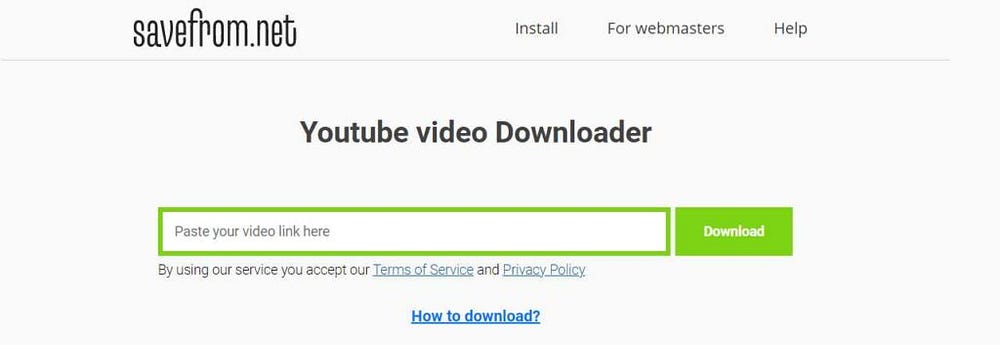
A major competitor on this list, SaveFromNet stands out because of its wide variety of supported video download websites for free. In addition to YouTube, it is also downloaded from websites such as Dailymotion, Vimeo, Sendpace, Metacafe, VK, and many more.

Just choose the available video resolution and download their captions in any language and, free of them allows you to download directly to MP3. Follow the link to learn more about SaveFromNet.

ByClick


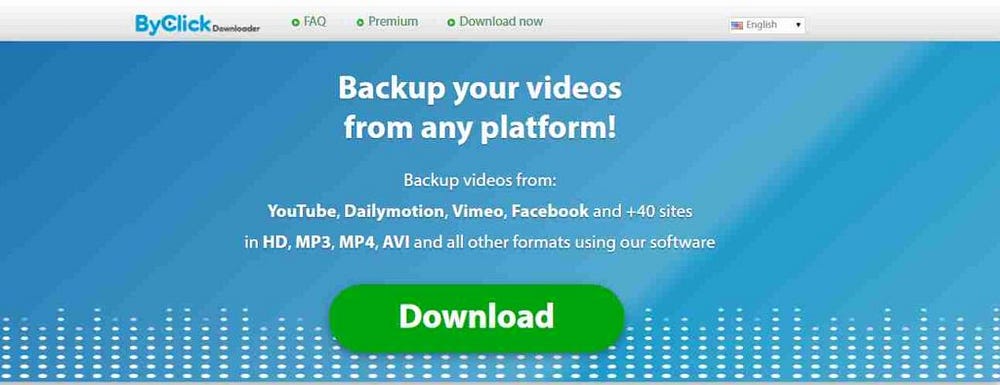
If we talk about only downloading from youtube then it will be okay, but ByClick not only lets you download youtube videos, it also allows to download videos from Facebook, Instagram, and many others. You can download video playlist by ByClick and save it easily to your drive.

Well, to do all, you just need to download and install the ByClik downloader to your PC and start your unlimited downloading.

If you are looking for an alternative to video downloading websites, then CatchVideo.net is a good choice. It captures videos in HD. The most wonderful feature is that it converts Videos to MP3s and also accompanies a large number of websites, such as Vimeo, Facebook, CollegeHumor, and Tumblr.

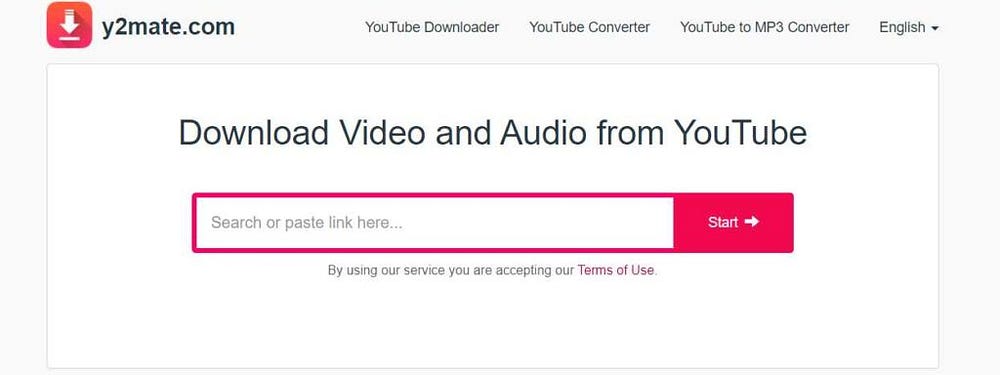
Y2mate is another best youtube video downloader as I used this site many times and each time it takes just a couple of seconds to start the download. Just copy the video URL and paste it to the search bar, it will be started downloading instantly.

It also allows downloading videos from Facebook, Dailymotion and, Youku, etc. Later it gives the option to convert these video files to MP3, MP4, WEBM as well in HD quality.

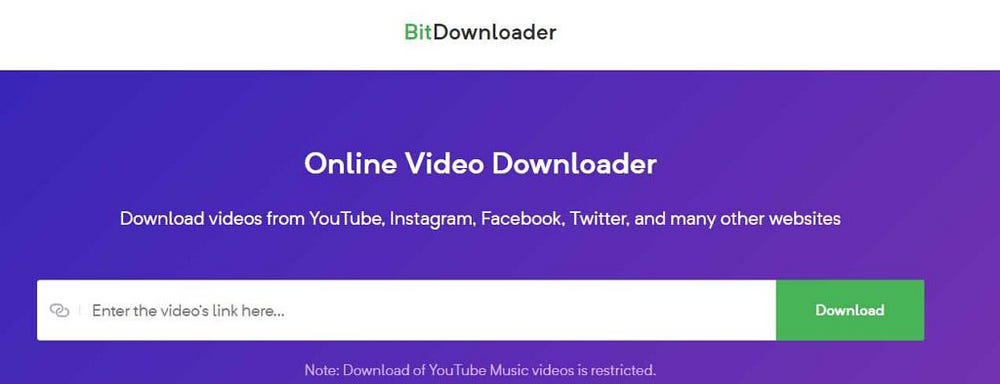
BitDownloader is a free software to download videos from Facebook, YouTube, Instagram and V Live without any sign-up or registration steps. You can export your downloads to many video formats, such as MP4 and WebM. But it has a little bit of complexity that you can only download videos up to 1080p resolution.

You can save your time by using any of the above video downloading tools. You can download plenty of videos for your future time. These tools also allow you to use a youtube converter mp3 to convert videos to audio files.


Originally published at https://marketgit.com on August 30, 2021.

Saturday, 14 August 2021

Best Sensitivity Setting in PUBG for Android devices in 2021 — MarketGit


While playing PUBG, sensitivity is the main cause as most of the players face this issue. We all know that sensitivity in the PUBG Mobile game plays a vital role so good settings will lead you to good and quick results like overcoming recoil control, targeting control, and headshot control in a faultless way.

The PUBG player plays the game to achieve the titles and higher ranking by completing missions. So only a good player can obtain these goals by having suitable sensitivity controls in PUBG that would lead him to the top.

To set up the sensitivity, players select the training room and check their skills by setting up the sensitivity.

PUBG Mobile: Camera, ADS, and Gyroscope Settings for Android Devices:

Camera Sensitivity


The camera sensitivity has a major role in PUBG for movements as it shows that how the camera shows the results as the player moves.

Here is the setting that will absolutely help to control the recoil of weapons in PUBG mobile:

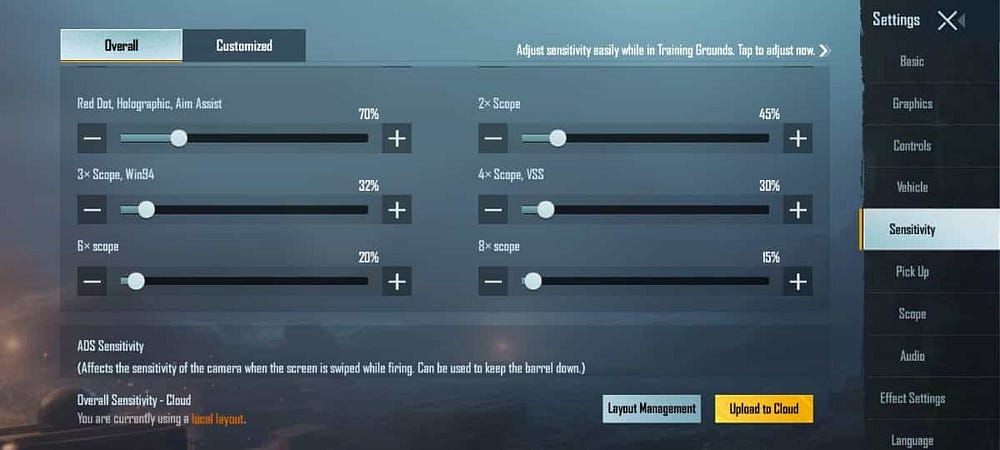
  • No range: 140%
  • Red dot, holographic, aim assist: 70%
  • 2x Range: 45%
  • 3x range: 32%
  • 4x ACOG, VSS range: 30%
  • 6x Range: 20%
  • 8x range: 15%

ADS (AIM Down Sight) Sensitivity


ADS is commonly known as Aim Down Sight. This is a way when the player selects an aim button that starts shooting the weapon in the player’s face and allows them to aim at getting a precise view of the range attached to the weapon or the attached reticle found in the gun itself.

Here I have mentioned the best sensitivity settings to reduce weapon recoil in PUBG Mobile:

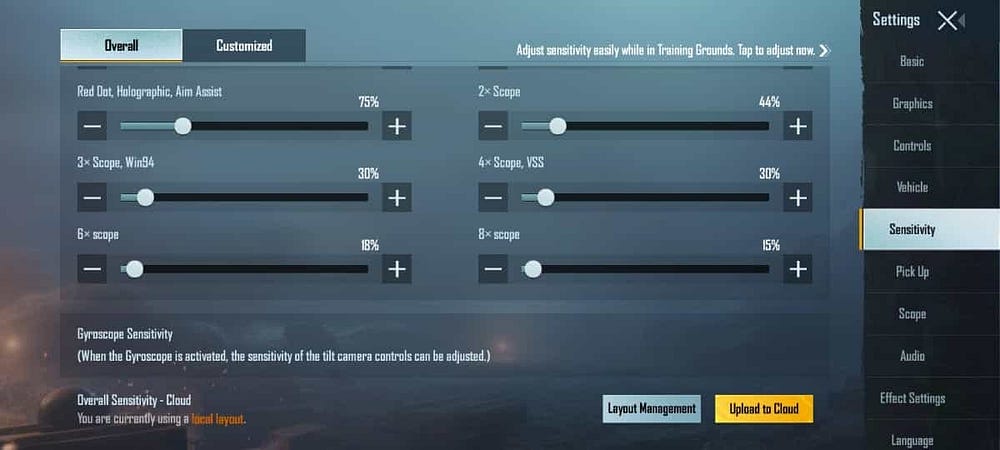
  • No range: 150%
  • Red dot, holographic, aim assist: 75%
  • 2x Range: 44%
  • 3x Range: 30%
  • 4x ACOG, VSS range: 30%
  • 6x range: 18%
  • 8x range: 15%

Gyroscope sensitivity


Most of the players love to play with Gyro type but they do not know that how to set gyroscope sensitivity in PUBG. Gyroscope sensitivity is actually is the device’s movement of the player as he moves the camera around the game. You may also try the best VPN for PUBG to speed up your game.

When the PUBG player changes the gyroscope sensitivity in PUBG Mobile, the speed at which the game tracks movements to adjust the screen direction is determined.

Here is the best gyroscope sensitivity setting in PUBG:

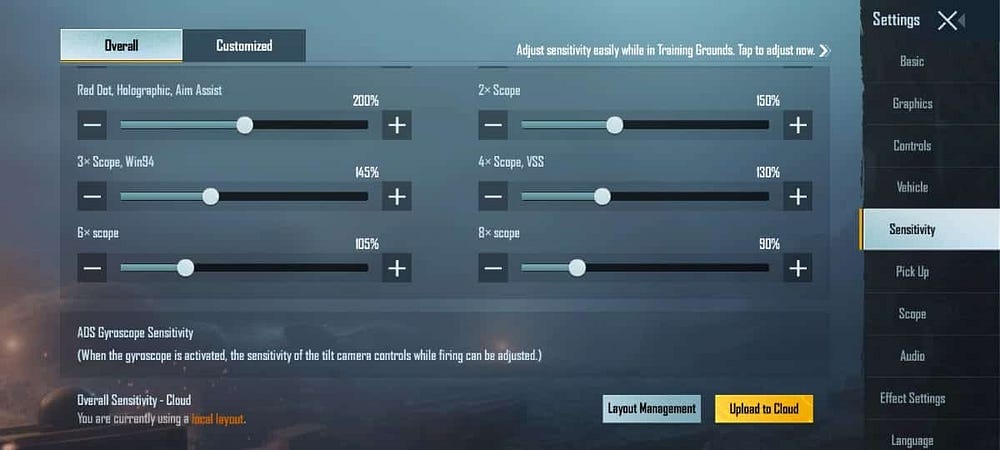
  • No range: 200%
  • Red dot, holographic, aim assist: 200%
  • 2x Range: 150%
  • 3x range: 145%
  • 4x ACOG, VSS range: 130%
  • 6x range: 105%
  • 8x range: 90%

After setting up all these things to control the sensitivity setting in PUBG mobile, then try with this setting in the training room and you will find good results.


Originally published at https://marketgit.com on August 14, 2021.

Wednesday, 4 August 2021

5 best article generator software to write high-quality content


Writing an article is not an easy task especially when you have a lack of time and having more than one blog. As you need to write and publish content to each blog continuously, but you don’t have enough time to write unique content for your blogs. Creating quality content, specifying keywords and blog ideas are a bit difficult. That’s why many bloggers are moving towards content writing software to save time and to generate quality content — the best article generator software

For this purpose, I have tried to elaborate on some best article generator software that will help you to generate top-quality content for blogging.

Here is the list of best article generator software to use in 2021:

GrowthBar


GrowthBar is the latest article generator software that generates content in a smooth way. So this creates outlines for your blog and does efficient things. It comes in a smart way as it has SEO features like keyword research, competitor analysis and, backlink analysis.

Now GrowthBar content generator tool will let you enter any keyword and it will generate SEO optimized outlines that help in higher ranking. Amazing thing is that the GrowthBar article generator tool monitors its ranking in search results after publishing.

Features:

  • OpenAI’s GPT-3 AI technology to generate human-like content
  • Takes only relevant keyword to write down the article
  • Provides monthly search volume of your published content
  • Generates SEO-optimized outlines for the blog
  • Provides free SEO features like keyword planning, rank tracking
  • GrowthBar has chrome extension also

Conversation AI


A well-organized and well-developed article generator tool that many bloggers and writers use is Conversation AI. As no one can distinguish between the content generated by the software. It completely looks like a human-like text. The team that works behind this software is ‘Jarvis’ which is a content writing tool that uses AI to write high-quality content.

Conversation AI is available in many languages like English, French, Spanish, Russian, and many more. The artificial intelligence technology of this software is trained by several copywriters and editing experts as they are used in site audit tools.

Feature:

  • ‘Boss Mode’ creates content 2-time faster
  • Works on the principle of the AIDA framework
  • It can generate AIDA articles, PAS copy ideas, creative stories, product features, emails, video ideas and suitable answers to Quora
  • Translated in to 11+ languages
  • Checks for grammatical errors
  • Easy integration with SEO software, Surfer

Article Forge


Article Forge is widely used content creator software on the internet. So many content creators use this tool as it generates unique and high-quality content just in 60 seconds. This software is also AI-based software and hence its fast and creative speed make the best choice for bloggers to write top articles by Article Forge. It can generate business, technology, finance and, health-relevant articles.

Article Forge can write up to seven languages like English, Dutch, Portuguese, Spanish, Italian, French and, German. As you only need to put your main keyword and sub-keyword. It will automatically generate unique content within 60 seconds.

Features:

  • 5-days free trial
  • Writes up to 7 languages
  • Generates article within 60 seconds
  • 30-day money-back guarantee
  • Top-quality and pass Copyscape

Kafkai


Kafkai is one of the best AI content creator software as it has low popularity and ratings but after using it personally, I have been surprised by its functioning. It generates top-quality content by using GPT-2 machine learning model in its software. So Kafkai has three modes and you can use them for your purpose. All of these modes are safe and perfect to create quality content and that’s why this is one of the best AI content generator software for SEO experts, bloggers, and marketers.

Features:

  • It can generate content into 25 niches
  • Offers three different content-generating modes
  • It has a WordPress plugin as well
  • Generates article in 6 languages

SEO Content Machine


As its name refers, this is one of the best article generator software for SEO and no one can touch its level. SEO Content Machine remained the best choice for marketers as they used this software a lot for the businesses, but now, due to its versatility, many SEO experts and digital marketers use this software to generate quality content for their PBNs and Web 2.0 sites.

However, SEO Content Machine is installable software, just download and install it. No further assistance or guide is required to use it. It works fine on Mac, Linux, and Windows. You can also target foreign readers through your articles.

Features:

  • Allows to generate content in multi-languages
  • It inserts images, videos, links and, subheadings automatically
  • Post instantly on a WordPress blog
  • Google scraper feature

In conclusion, no one is perfect to write and create articles. Everyone do mistakes including me as well but ‘experience makes a man perfect. Sometimes I also use article generator software. This method is totally legal and SEO-optimized. You can save a lot of time by using the best content generator tools in your blogging carrier.


Originally published at https://marketgit.com on August 4, 2021.

Sunday, 1 August 2021


Hyper Scape is one of the best and newly launched video games from Ubisoft. Hyper Scape was debuted on July 12, 2020, in beta format. This is developed by the same team as Rainbow Six Siege was developed. Hyper Scape is a first-person online battle royale for PC. This video game has vertical scenarios and hacks that give abilities to players to attack and defend – download Hyper Scape game

Nowadays, Hyper Scape is being most famous in the world. So you can free download hyper scape for PC and I am going to show you how to download Hyper Scape from Ubisoft.

How to download and install Hyper Scape on PC free:

Step 1: Create an account of Ubisoft for free

Step 2: Go to the official website of Hyper Scape

Step 3: Click on download or “join the open beta”

Step 4: Choose the platform on which you want Hyper Scape to play

Step 5: Now login with your Ubisoft account (You can also use Facebook, Xbox, Twitch, or Play Station accounts but you need to connect them with Ubisoft)

Step 6: After a successful login attempt, it will show that “Hyper Scape is added to your library”. Now, open your Uplay app. If you don,t have Uplay then click download Uplay for free which is the game store of Ubisoft. Then follow the onscreen instructions.

Step 7: Choose the tab ‘Games’ in Uplay and find the Hyper Scape icon. Choose the destination folder where you want to install Hyper Scape for free.. Just click on ‘Play’ and enjoy the game in Neo-Arcadia.

Hyper Scape: A complete Royale Battle

How to download Hyper Scape Game on PC free
image via game-debate.com

When you play the game, all players will be brought to a virtual space and all players will compete for survival. There are two possibilities to win the match: first, survive till last, and second is, capture the crown and save it as much as possible. To get better graphics and results, you need to purchase the best gaming smarphones.

Neo-Arcadia map has features like skyscrapers and a sequence of thrusters that encourages the players to explore the heights. Players will not get damaged while falling from the sky.

The loot system is also best, collecting more loots will give more power to their weapons. Hyper Scape also provides the abilities for the players like barriers, mines, invisibility, and some other hacks to defend and attack.

Explore more about Hyper Scape

However, One main component of Hyper Scape Royale Battle that differs it from all other games is the best game progression system. It doesn’t force players to come into the central point as other games do. Hyper Scape allows players to destroy the entire city of Neo-Arcadia.

So decay may change. Players need to look at a map to see which points are closer to disappearing and look for other defensive positions.